
.png)

The reasons are well-worn: unclear ROI, integration complexity, lack of stakeholder buy-in. But there's another killer that doesn't get enough attention: slow validation cycles. When it takes weeks to prove your AI works, momentum dies. Stakeholders lose interest. The project stalls in pilot purgatory.
We saw this as a risk on of our recent projects.
The agentic solution we built seemed to work great. The problem was that our stakeholders were very busy and getting time from them to validate outputs was difficult, which threatened our delivery timelines.
That's where LLM-as-a-judge helped.
The problem: Great tech, limited testing capacity
Our agent is built on Databricks, pulling information from client documents to surface guidelines and assess against input. The architecture worked, vector search returned chunks, the agent responded. But was it returning the right chunks?
To assess this, we needed the stakeholders’ time. This was in limited capacity, so we needed some way to assess the outputs consistently. Enter LLM-as-a-judge.
What Is LLM-as-a-judge?
The concept is straightforward: use an LLM to evaluate another model's output, whether that is a generative model, a retrieval system, or a complete RAG pipeline.
Instead of humans manually scoring each response, you define your evaluation criteria. A separate LLM (the judge) reads your agent's output and scores it against those criteria. It's automated, fast, and deterministic.
MLflow 3 includes built-in LLM scorers for common quality checks: correctness, relevance, and safety. In our case, we needed to know: did the agent retrieve the right sections? So, we used the RetrievalRelevance Scorer, which evaluates whether retrieved documents are semantically relevant to the input query.
Technical architecture: The full stack
Before diving into evaluation, let's walk through the technical architecture that powers the AI agent.
Data layer and retrieval pipeline
All raw unstructured data is stored in Databricks Unity Catalog volumes. The files are ingested into bronze tables using Databricks Autoloader, then parsed into the silver layer and embedded into the gold layer as a Vector Search Index.
Document chunking and embedding strategy
In Databricks notebooks, we designed a document chunking and embedding strategy using databricks-gte-large (foundation model available in Unity Catalog). The chunking strategy balanced context preservation with retrieval precision
We created a vectorised search index using Databricks Mosaic AI Vector Search, which provides approximate nearest neighbour (ANN) search capabilities with sub-second latency. The index stores both the embeddings and metadata for each chunk, enabling filtered retrieval based on document source, section type, or other attributes.
LLM integration and query expansion
To improve retrieval quality, we introduced an LLM for two purposes: chunk context enrichment and query expansion.
- Chunk context enrichment: Before embedding, we use an LLM (Databricks ai_query) to add contextual metadata to each chunk, summarising its role in the broader document and identifying key entities and concepts. This improves embedding quality for dense passages that might otherwise lack discriminative features.
- Query expansion: User queries are often underspecified. We use an LLM to expand the original query with synonyms, related concepts, and inferred intent before retrieval.
Agent Deployment
The vector search index, prompt and additional configuration are packaged into an LangChain chain and deployed as an agent using databricks-agent and MLflow. This allows for observability and use within both the AI playground and Databricks model serving.
Implementation: The evaluation pipeline
Here's how we set up LLM-as-a-judge. The implementation leverages MLflow's genai framework:
import mlflow
from mlflow.genai.scorers import RetrievalRelevance
from mlflow.entities import Document
from typing import List

@mlflow.trace(span_type="RETRIEVER")
def retrieve_docs(query: str) -> List[Document]:
    # Vector similarity search against our index
    results = index.similarity_search(
        query_text=query,
        columns=["chunk_index", "chunk_text", "filename"],
        num_results=20  # Tuned for recall vs precision trade-off
    )
    return [Document(id=r[0], page_content=r[1],
                     metadata={"source": r[2]})
            for r in results['result']['data_array']]

# Run evaluation with RetrievalRelevance scorer
eval_results = mlflow.genai.evaluate(
    data=eval_dataset,
    predict_fn=rag_app,
    scorers=[RetrievalRelevance()]
)
The @mlflow.tracedecorator with span_type="RETRIEVER" is critical - it tells the evaluation framework which function performs retrieval, enabling automatic extraction of retrieved documents for relevance scoring.
Results: Quantifying retrieval quality
We ran two rounds of evaluation using MLflow's built-in evaluation library to benchmark against ground truth test cases.
Iteration 1: Focused testing with ground truth
We started with three specific sections of the documents. For these sections, we had manually curated ground truth labels, enabling us to compute true precision and recall.
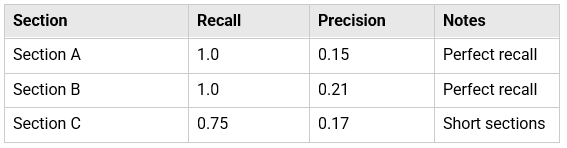
The recall-precision trade-off was immediately apparent. Setting num_results=20 gave us excellent recall - we retrieved 100% of relevant sections for two out of three categories - but precision hovered around 15-21%.
Section C recall at 0.75 highlighted a known challenge: shorter guide sections with limited context produce weaker embeddings, making them harder to retrieve via semantic similarity.
Iteration 2: Scaling to full coverage
The original intention for iteration 2 was to use the Databricks Review App to allow the stakeholders to provide feedback on the agent. Instead, due to limited testing capacity and a desire to prove accuracy against all sections, we pivoted to expand the scope of our testing to the entire document set.
Without ground truth test cases for the full corpus, we used LLM-as-a-judge to understand relevance and examined the similarity scores of returned chunks:
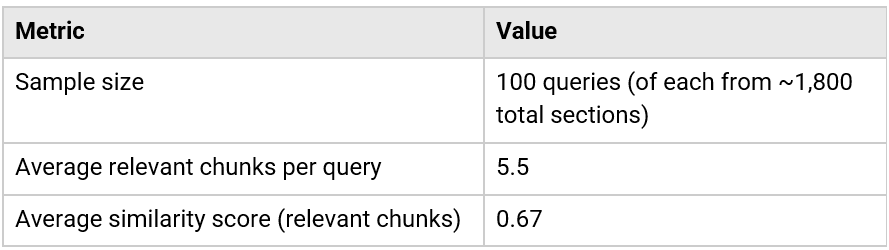
Without LLM-as-a-judge, evaluating 100 test cases against the full guide would have taken weeks of manual review. With it, we got results in hours. The Databricks Review App still gave stakeholders hands-on access to test the AI assistant themselves, supported by full logs and dashboards for instant summaries and actionable insights.
Evaluation metrics: A technical deep dive
For teams implementing similar systems, here's a breakdown of the metrics we tracked:
- Recall: The percentage of all relevant chunks that were returned. With ground truth labels, this tells you whether you're missing critical information. A recall of 1.0 means you retrieved 100% of the relevant sections.
- Precision: The percentage of returned chunks that were relevant. In the absence of ground truth, this is based on LLM-as-a-judge evaluations. Low precision (0.15-0.21) indicates we're returning many irrelevant chunks alongside the relevant ones.
- NDCG (normalised discounted cumulative gain): A ranking-aware metric that rewards relevant documents appearing earlier in the result list. Unlike precision and recall, NDCG accounts for the position of relevant results, critical for RAG systems where the LLM consumes documents in order.
- Similarity score: The cosine similarity between query and document embeddings. Our average of 0.67 indicates moderate semantic alignment, meaning there’s room for improvement through better chunking or embedding strategies.
The trade-offs: Where LLM-as-a-judge excels (and where it doesn't)
What worked
- Speed. We evaluated 100 test cases per section of 1,800 sections in the time it would take to manually review a handful. That velocity is the difference between iterating daily versus weekly.
- Consistency. Every evaluation used the same criteria. No variance in scoring. No subjective interpretation. This made it easy to track improvements over time.
- Low-effort validation. When stakeholder availability is limited, automated evaluation keeps the project moving. We didn't need stakeholders in the loop for every iteration.
- MLflow integration. Everything logged automatically. We could compare runs, track metrics over time, and visualise results without building custom dashboards.
What was harder
Extracting results for complex workflows. MLflow logs everything in an easy-to-use UI, but surfacing the results of the evaluation and feeding them back into our agentic workflow was challenging. Using the SDK to pull back the evaluation results revealed inputs and results were nested in separate JSON columns within experiment runs (rows in a Pandas DataFrame) with no clear indexing to one another.
This will shortly change as storing trace information in Unity Catalog will soon become available.
Not a replacement for human judgement. LLM-as-a-judge gives you a proxy for quality, not ground truth. For final validation, you still need domain experts.
Production considerations: Cost, latency, and quality gates
We're considering LLM-as-a-judge for production, not just development. As another quality control gate, it can be a powerful tool in providing high-quality results especially in highly regulated industries.
The trade-off is latency and cost. Every response gets scored by another LLM call. As mentioned above, evaluating 100 test cases took ~4 hours, which if the frequency of the increases, will not scale in production (noting that the evaluation will not be run in bulk but more adhoc). Depending on the size of the team and number of risk assessments, this trade-off will need to be reviewed.
How to join the 5%
Remember the 5% of AI projects that make it to production? LLM-as-a-judge can be a vital tool in getting there.
There is still a need for solid architecture, clear use cases, and stakeholder alignment. But automated evaluation lets you iterate fast enough to maintain momentum. You can prove your agent works before enthusiasm wanes and budget disappears.
For our AI agent, we went from demo to validated proof-of-concept in weeks, not months. That speed kept stakeholders engaged and built confidence for production planning.
Here's what we learned:
- Use it early. Don't wait until you have perfect test coverage. Start evaluating as soon as you have a working prototype. Early validation prevents late-stage surprises.
- Combine with traditional metrics. LLM judges are powerful for semantic evaluation, but don't ignore precision, recall, NDCG, and latency. You need both qualitative and quantitative evidence.
- Iterate on your judges. Your first evaluation criteria won't be perfect. Refine them as you learn what matters. We adjusted our guidelines after seeing initial results.
- Track everything in MLflow. The experiment tracking isn't just for development. It becomes your proof when stakeholders ask, "how do you know it works?"
Building AI that makes it to production requires more than good models. It requires fast validation, clear metrics, and maintained momentum. We've helped clients navigate this path with Databricks. Get in touch if you're trying to join the 5%.
Useful Links
[1] https://docs.databricks.com/aws/en/mlflow3/genai/eval-monitor/concepts/scorers
[2] https://docs.databricks.com/aws/en/generative-ai/tutorials/agent-quickstart
[3] https://learn.microsoft.com/en-us/azure/databricks/mlflow3/genai/tracing/trace-unity-catalog



.png)